# DullWave使用教程

{% hint style="success" %} <mark style="color:green;">**使用注入前必须确保卸载你电脑的上**</mark><mark style="color:green;">**`杀软软件`**</mark><mark style="color:green;">**与**</mark><mark style="color:green;">**`Win10`**</mark><mark style="color:green;">**/**</mark><mark style="color:green;">**`Win11`**</mark><mark style="color:green;">**系统**</mark><mark style="color:green;">**`自带杀毒`**</mark>

<mark style="color:green;">**必须在**</mark><mark style="color:green;">**`BIOS`**</mark><mark style="color:green;">**中禁用安全启动**</mark>

<mark style="color:green;">**使用卸载软件删除**</mark><mark style="color:green;">**&#x20;**</mark><mark style="color:green;">**`FaceIT Anti-Cheat`**</mark><mark style="color:green;">**&#x20;**</mark><mark style="color:green;">**和**</mark><mark style="color:green;">**&#x20;**</mark><mark style="color:green;">**`Riot Vanguard(Valorant AC)`**</mark>

<mark style="color:green;">**确保你拥有正确版本的Windows,WH-SATANO仅适用于 Windows 10**</mark><mark style="color:green;">**&#x20;**</mark>*<mark style="color:green;">**\[1903、1909、2004、20 H1、20 H2、21 H1、21H2]**</mark>*
{% endhint %}

## 下载

{% embed url="<https://dullwave.ru/web/download/dayz&action=start>" %}

### 加速器

> **网络不好的务必自己使用科学上网 如果科学上网不起作用 请使用`3A加速器` 加速`瓦洛兰特`全区服**

{% embed url="<https://www.3ayx.net/act/invite/?inviter=4jbxCpTUImc1f/aQaBrw4A==>" %}

## 激活

> **下载后`管理员运行`注入器,然后输入激活码`激活`,激活后注入器会`关闭`,重新`打开`即可**

<figure><img src="/files/YJhr5frRKVqZCcbPsH3i" alt=""><figcaption></figcaption></figure>

## **注入**

> **管理员运行注入器,然后等待**

<figure><img src="/files/oormgIuzAJc9XUwEYibD" alt=""><figcaption></figcaption></figure>

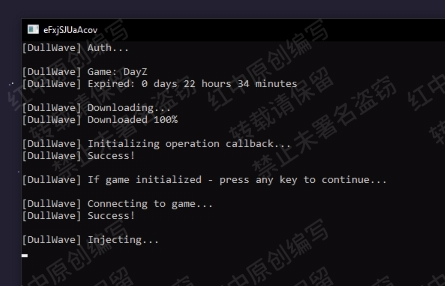
> **出现“`If Game Initialized - Press any key to continue`”后 -,开始游戏并等待注入器加载**
>
> **等待游戏完全启动并加载**
>
> **然后最小化游戏窗口并在加载程序中按 `Enter`/`回车`**
>
> **在注入器窗口看到`Success`字样.**
>
> **代表已经注入成功**
<figure><img src="/files/Ga72lvQBMReKdWjHsDsa" alt=""><figcaption></figcaption></figure>

## **使用**

**点击 `↑`/`Fn+Up/TAB` 呼出/隐藏菜单**

&#x20;**`鼠标点击` 操控菜单**


---

# Agent Instructions: Querying This Documentation

If you need additional information that is not directly available in this page, you can query the documentation dynamically by asking a question.

Perform an HTTP GET request on the current page URL with the `ask` query parameter:

```
GET https://docs.hzz.im/g/dayz/dullwave/use.md?ask=<question>
```

The question should be specific, self-contained, and written in natural language.
The response will contain a direct answer to the question and relevant excerpts and sources from the documentation.

Use this mechanism when the answer is not explicitly present in the current page, you need clarification or additional context, or you want to retrieve related documentation sections.
